Grand Piano and Keyboard8.1.3
Publisher Description



Learn Scales and Chords with Realistic 88 Key Grand Piano with Real Instruments
🎹 Grand Piano & Keyboard – Real Piano, Real Practice, Real Music!
Experience the power of a full 88-key grand piano right on your Android device!
Whether you’re a beginner learning scales, a musician composing on the go, or a performer rehearsing on stage, Grand Piano & Keyboard brings you the authentic sound and feel of a professional instrument — all from your phone or tablet.
🎵 Play, Learn & Practice – Anytime, Anywhere!
Grand Piano is more than just a virtual piano app — it’s your complete musical companion with built-in tools for music theory, chords, scales, recording, and performance.
🌟 App Features:
✅ 88-Key Realistic Piano – True grand piano layout with 7 full octaves
✅ Ultra-Fast Response Time – Instant key feedback for a smooth, almost real-time playing experience without much latency
✅ Multi-Touch Support – Play expressive chords and melodies effortlessly
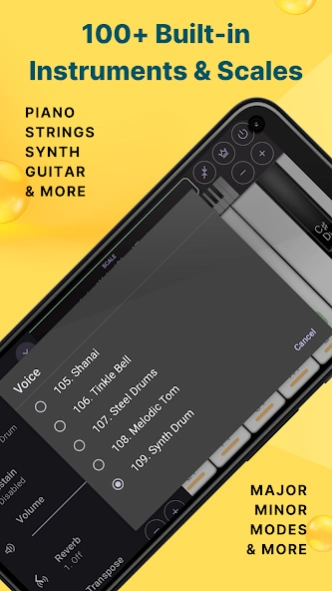
✅ 109 Built-in Instruments – Piano, Organ, Strings, Guitar, Synth, Trumpet, Bass, Violin & many more
✅ Authentic Polyphonic Sound Engine – Rich, realistic audio for every note
✅ Multiple Key Label Modes – Show note names as A-B-C, Do-Re-Mi (Solfege), or 1-2-3 numbering system
✅ Scale Library (120+ Scales) – Major, Minor, Pentatonic, Blues, Exotic & more
✅ Chord Mode – Instantly play diatonic triads and 7th chords for any scale
✅ Transpose Function – Shift your music ±12 semitones with ease
✅ Metronome with Sound Options – Stay on beat with customizable tempo and clicks
✅ Advanced Reverb Effects – Choose from 4 types for studio-like sound
✅ Sustain Pedal Effect – Just like a real acoustic piano
✅ Scale & Chord Highlighting – Visualize what you're playing as you play it
✅ Multiple Key Label Modes – A-B-C, Do-Re-Mi (Solfege), or 1-2-3 numbering system
✅ Recording & Playback – Save your practice, ideas, or performances
✅ Customizable Key Width – Adjust for small or large screens
✅ Tablet & Phone Optimized – Smooth performance on all screen sizes
✅ 100% Free to Play – With optional upgrades for power users
🎼 Designed for:
🎹 Pianists & keyboard players
🎶 Musicians, composers, and songwriters
🧠 Music theory learners & teachers
🎓 Students preparing for music exams
🎧 Anyone who loves creating music
🔓 Want More? Go Premium! Unlock even more:
🎵 Full instrument library access
🎵 Unlimited recording saves
🎵 Remove ads for distraction-free playing
🎵 Early access to new features
🎁 Try premium features FREE for a limited time!
🎯 Why Choose Grand Piano?
Unlike other piano apps focused only on tapping songs or games, Grand Piano & Keyboard is built for real musicians. Whether you're practicing scales, composing music, or preparing for a live gig, you'll love the professional-grade features, realistic sounds, and intuitive design.
👉 Download now and start your musical journey today.
🎶 Practice. Perform. Create. Anywhere. 🎶
About Grand Piano and Keyboard
The company that develops Grand Piano and Keyboard is PG App Studio. The latest version released by its developer is 8.1.3.
To install Grand Piano and Keyboard on your Android device, just click the green Continue To App button above to start the installation process. The app is listed on our website since 2026-10-04 and was downloaded 60 times. We have already checked if the download link is safe, however for your own protection we recommend that you scan the downloaded app with your antivirus. Your antivirus may detect the Grand Piano and Keyboard as malware as malware if the download link to app.pg.grandpiano is broken.
How to install Grand Piano and Keyboard on your Android device:
- Click on the Continue To App button on our website. This will redirect you to Google Play.
- Once the Grand Piano and Keyboard is shown in the Google Play listing of your Android device, you can start its download and installation. Tap on the Install button located below the search bar and to the right of the app icon.
- A pop-up window with the permissions required by Grand Piano and Keyboard will be shown. Click on Accept to continue the process.
- Grand Piano and Keyboard will be downloaded onto your device, displaying a progress. Once the download completes, the installation will start and you'll get a notification after the installation is finished.
Program Details
System requirements
Download information
Pricing
Version History
version 8.1.3
posted on 2026-10-04
✓ Refined the spacing between black keys for a more realistic piano layout
✓ Added an option to hide the banner ad
✓ Improved user interface
✓ Fixed several bugs
version 8.1.1
posted on 2026-09-30
✓ Improved UI for a smoother experience
version 8.0.4
posted on 2026-08-17
✓ Fixed few bugs
version 7.2.3
posted on 2026-07-18
✓ Increased the interval before showing the first full-screen ad
✓ Enhanced chord playback in Chord Pad
✓ Improved user interface
version 7.2.2
posted on 2026-05-13
✓ Improved user interface
✓ Added option to display simplified note names
✓ Introduced feature request and voting system
✓ Fixed audio muting issue when switching headphones
✓ Fixed few bugs
version 7.1.8
posted on 2026-04-22
✓ Improved user interface
✓ Added option to display simplified note names
✓ Introduced feature request and voting system
✓ Fixed audio muting issue when switching headphones
version 7.1.7
posted on 2025-12-02
✓ Enhanced UI
✓ Fixed few bugs
version 7.1.6
posted on 2025-12-02
✓ Reduced advertisements
✓ Fixed few bugs
version 7.1.5
posted on 2025-10-19
✓ Added support for Indian Sa Re Ga Ma scale notations
version 7.1.3
posted on 2025-06-16
✔ Important bug fixes
